Bentone: A Handwritten Font That Elevates Web Design
As a web designer, I'm always on the lookout for fonts that bring personality to digital spaces without compromising usability. Recently, I tested Bentone — a friendly and cute handwritten font from Script Amp — in a few real-world website scenarios. The results were promising, and I wanted to share how this typeface can enhance your online brand experience.
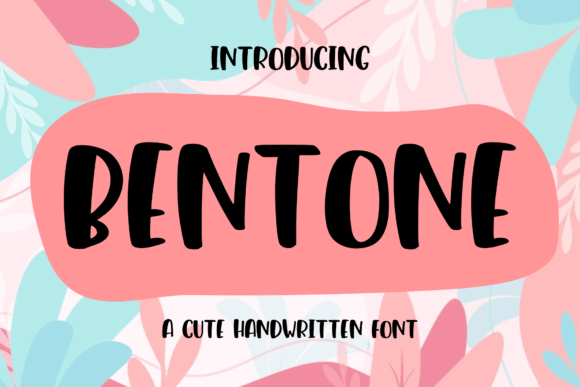
Bentone has a soft, approachable charm that immediately draws the eye. Its gentle curves and casual style give it a warm, human feel, making it perfect for websites that want to convey creativity, authenticity, or a personal touch. It's not just a font; it's a visual storytelling tool that adds character to every project it touches.
Testing Bentone in a Hero Section
I first used Bentone on a hero section of a boutique online store. The goal was to create a welcoming headline that would catch attention while maintaining readability. When I applied Bentone to the main title, it instantly gave the page a more inviting and handcrafted vibe. The font’s subtle imperfections felt natural, almost like a personal message from the brand itself.
On mobile screens, the font remained legible, which is crucial for user experience. I noticed that the spacing between letters was well-balanced, ensuring that even on smaller devices, the text didn't appear cluttered. This made Bentone an excellent choice for responsive design, where typography needs to adapt seamlessly across different screen sizes.
Pairing Bentone with Complementary Fonts
One of the key considerations when using a decorative font like Bentone is pairing it with a clean, readable body font. For this project, I chose a simple sans serif font for the supporting text. The contrast between the two was perfect — Bentone brought warmth and character to the headlines, while the sans serif provided clarity and professionalism to the rest of the content.
This combination worked especially well for a creative portfolio site. The handmade feel of Bentone added a unique touch to the hero section, while the body text remained easy to read, allowing visitors to focus on the content rather than the typography.
Using Bentone for Call-to-Action Elements
Another place where Bentone shined was in call-to-action (CTA) buttons. I experimented with using it for buttons like "Shop Now" and "Learn More." The font's playful nature encouraged interaction, making the CTAs feel more inviting and less formal. However, I found that it worked best for short phrases, as longer text could become hard to read on small buttons.
For larger CTA sections, such as banners or promotional blocks, Bentone added a sense of urgency and excitement. It was particularly effective when placed over image overlays, where its organic feel complemented the visuals perfectly.
When Bentone Might Not Be the Best Choice
While Bentone is a great addition to many digital projects, it's important to recognize its limitations. It's not ideal for long paragraphs or dense blocks of text, as its decorative nature can make reading difficult. I also found that it wasn’t suitable for small navigation menus or form labels, where clarity is essential for usability.
Additionally, if you're designing for accessibility-focused interfaces or complex dashboards, a more straightforward font might be better suited to ensure all users can easily navigate the content.
Final Thoughts on Bentone for Digital Projects
Overall, Bentone proved to be a versatile and expressive font that can elevate various aspects of web design. Whether you're working on a boutique shop, a coaching website, or a course landing page, this handwritten font offers a unique way to add personality and warmth to your digital brand.
Before implementing Bentone into your web projects, make sure to check its available styles, weights, and whether it includes webfont support. Also, confirm that it has proper commercial licensing if you're using it for client work, online stores, or branded assets. With the right pairing and thoughtful application, Bentone can be a valuable asset in your design toolkit.